Product UI/UX Design System

Governing what no spreadsheet can hold

Multi-unit retail operations were running on manual processes: stock thresholds watched by hand, employees onboarded across disconnected files, access policies communicated individually with no way to verify compliance. Instivo needed a governed data layer that operators could build and own without IT in the room.

0

IT tickets required for config changes · managers act directly

5×

projected unit onboarding speed · pre-configured hierarchy, local adjustments only

1

entity record · referenced across all modules with no duplication

Role

Product Designer

Platform

Web · SaaS

Users

3 role types

Status

NDA · 7 months

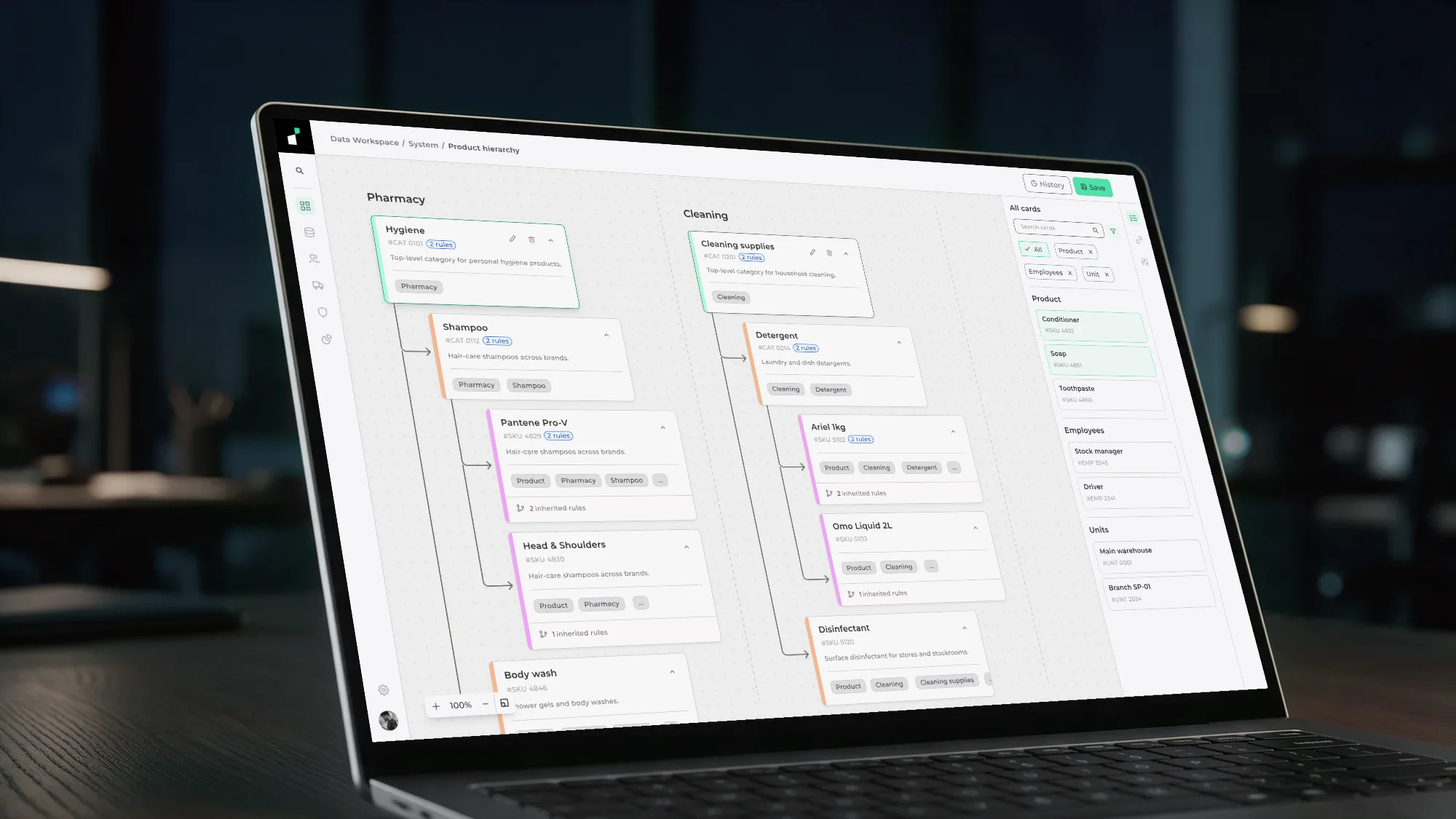
Instivo Data Workspace canvas with hierarchy cards and rule engine

The shift · six disconnected tools → one workspace

Before and after Instivo: spreadsheets, phone calls, a generic CRM, a notepad, email threads, and a manual clock collapse into one connected workspace with real-time stock visibility, unified employee hierarchy, automated restocking, configurable rules, and fleet and dock management

Retail operations were governed by whoever remembered to act, across six tools that never talked to each other. Instivo collapses all of it into one connected workspace.

01

The problem

Retail companies with multiple units had no single place to manage their own operations. Employee records lived in spreadsheets. Supplier orders happened over the phone. Stock was counted manually. A CRM handled the customer side, but nothing governed what happened internally.

A product dropping below 50 units had no automatic trigger. Someone had to notice, find the supplier contact, call, and follow up.

A new employee required manual updates across multiple files with no enforcement that it had been done. An access policy change had to be communicated individually, with no mechanism to verify compliance.

Instivo was built to replace this fragmentation. But a platform where managers configure rules, stock thresholds trigger automatic restocking, and entire operational hierarchies are structured in one place needs something underneath it that most SaaS products skip: a governed data layer that the operation itself controls.

02

The product

The Data Workspace is where data is created, structured, and maintained. Everything else in Instivo, every screen, every report, every form, reads directly from what lives inside it.

Every field available in a form across the platform, every category a product can belong to, every role an employee can be assigned traces back to a hierarchy built here. Scheduling a dock requires the driver's role, the truck's registration, the dock number, the warehouse it belongs to, and the management chain above it. None of that exists unless someone built it in the Data Workspace first.

System workspaces

Ship pre-configured and feed critical platform functions. They cannot be deleted. They are the structural foundation that everything else depends on.

Free workspaces

Created by users for their own organizational purposes. No downstream consequences if modified or removed. Full flexibility within the system boundary.

The distinction mattered for more than technical reasons. The same interface that gives a manager flexibility to build custom hierarchies also sits one wrong deletion away from breaking a form that every new employee depends on.

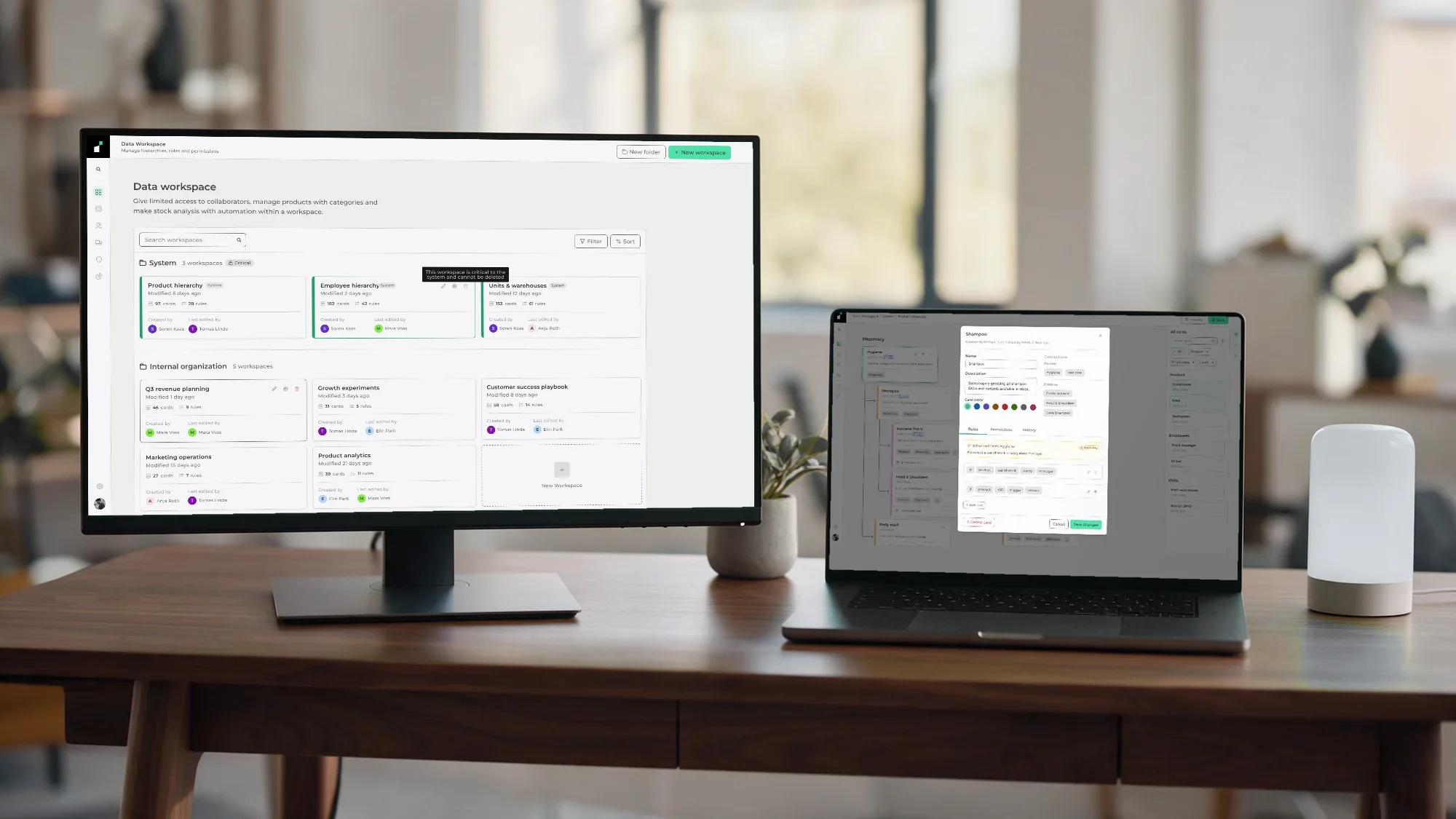
Workspace list showing System workspaces with a locked, critical badge, separate from user-created Internal organization workspaces

Workspace list · System workspaces locked, Free workspaces fully editable

03

Three users, one system

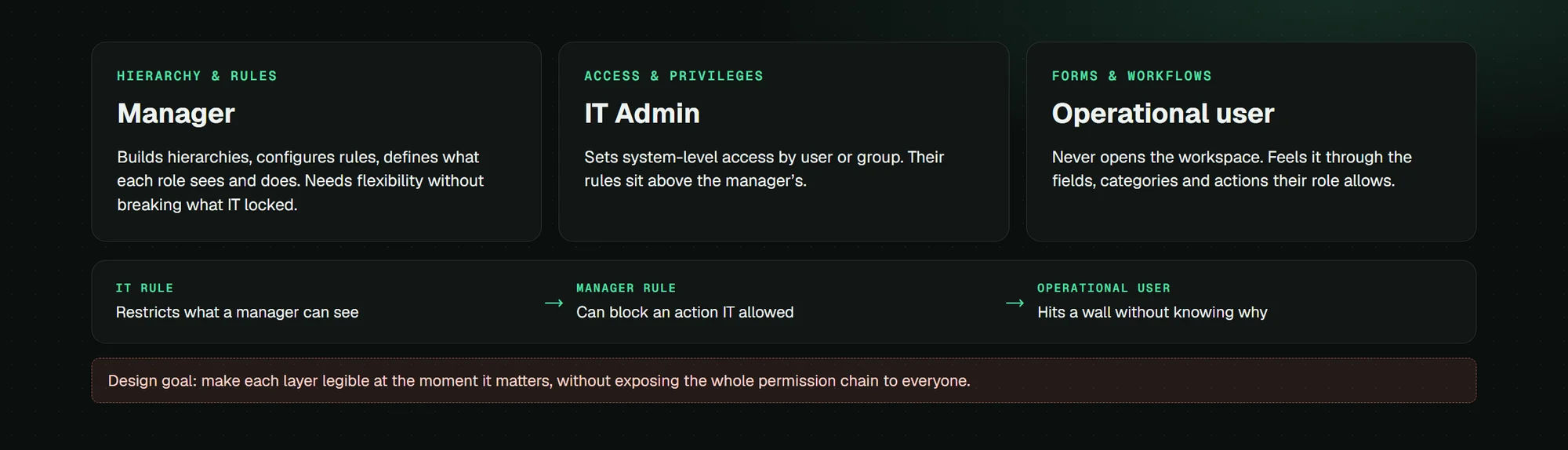
Three different roles interacted with the platform, each with a different surface. A rule built for the IT Admin could silently block something a Manager depended on. Getting the permission model right required designing all three simultaneously.

Manager

Hierarchy & rules

Builds and maintains hierarchies, configures rules, defines what each role can see and do. Needs flexibility without being able to break what IT locked down.

IT Admin

Access & privileges

Sets system-level access and defines privileges by user or group. Their rules sit above the manager's. Conflicts happen invisibly unless the interface surfaces them.

Operational user

Forms & workflows

Never opens the Data Workspace. Experiences it through the fields available in a form, the categories visible in a panel, the actions their role permits.

The layering problem was specific. An IT rule could restrict what a manager sees. A manager rule could block an operational action even if IT had granted access. Both could be true simultaneously, invisibly, with no conflict surfaced to the user who hit the wall.

The interface had to make those layers legible without exposing the full permission chain to every user. A manager needed to know their rule would propagate. An operational user needed to know why an action was unavailable.

User flow: Manager, IT Admin, and Operational user across the system

Conceptual model of the layering logic, not a product screen.

04

The hierarchy

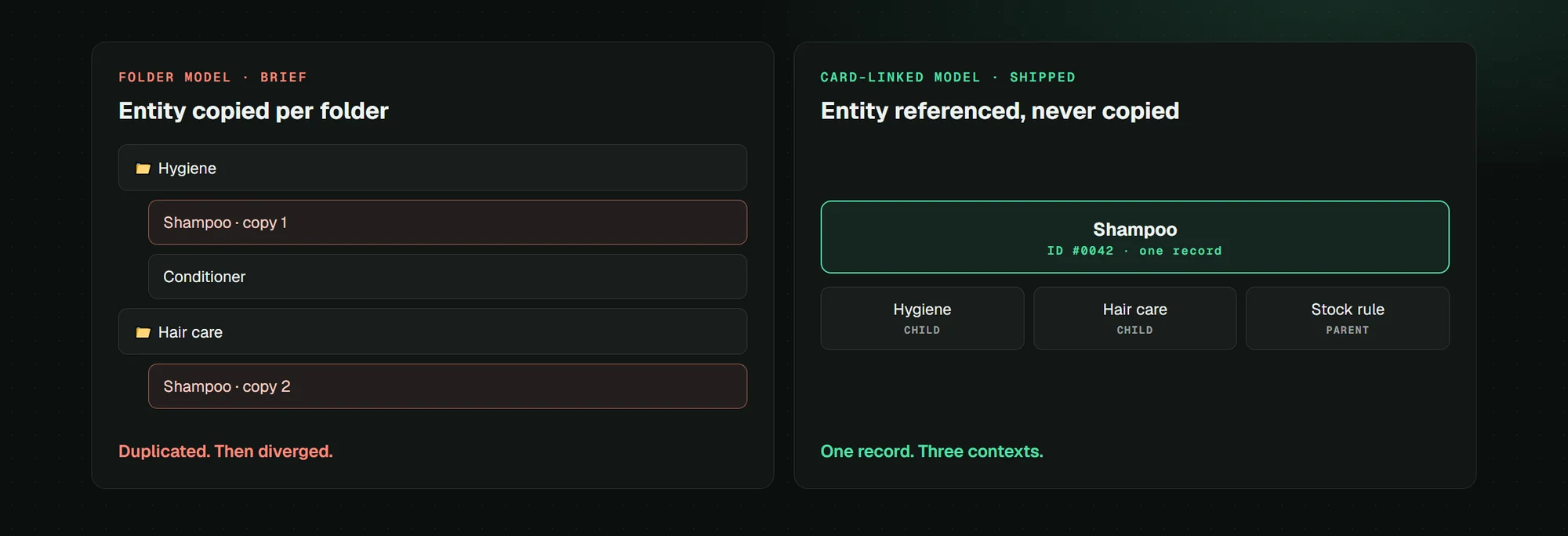
The original brief called for a folder system. A folder contains files. Files belong to one folder. The hierarchy is linear and the relationship is one-directional.

A shampoo product belongs to hygiene, hair care, and personal care simultaneously. In a folder model, it can only live in one.

The other two either duplicate the entry or lose the relationship entirely. I proposed a card-based system where entities are linked rather than nested.

Folder model Card-linked model 📁 Hygiene Shampoo (copy 1) Conditioner 📁 Hair Care Shampoo (copy 2) Duplicated. Diverged. SHAMPOO · ID #0042 Single entity · unique ID Hygiene child role Hair Care child role Stock rule parent role One record. Three contexts. Entity duplicated per folder Entity referenced, never copied

Folder model vs. card-linked model · why a folder structure breaks for shared entities

Each card represents a real entity in the system with a unique ID. The same card can be referenced in multiple workspaces, playing a different structural role in each. In the product hierarchy it is a child of hygiene. In the stock workspace it is a parent to a restocking threshold. In the transport workspace it is a child of a cargo category.

The analogy I used internally was design tokens. A token is a value that lives in a system of references, and its meaning depends on the context in which it is used. The canvas reorganized automatically as connections multiplied, removing the responsibility for legibility from the user.

Pharmacy hierarchy on the canvas: linked entity cards with rule counts and inherited-rule badges

Pharmacy hierarchy on the canvas · linked cards with rule counts and inherited-rule badges

05

The rule engine

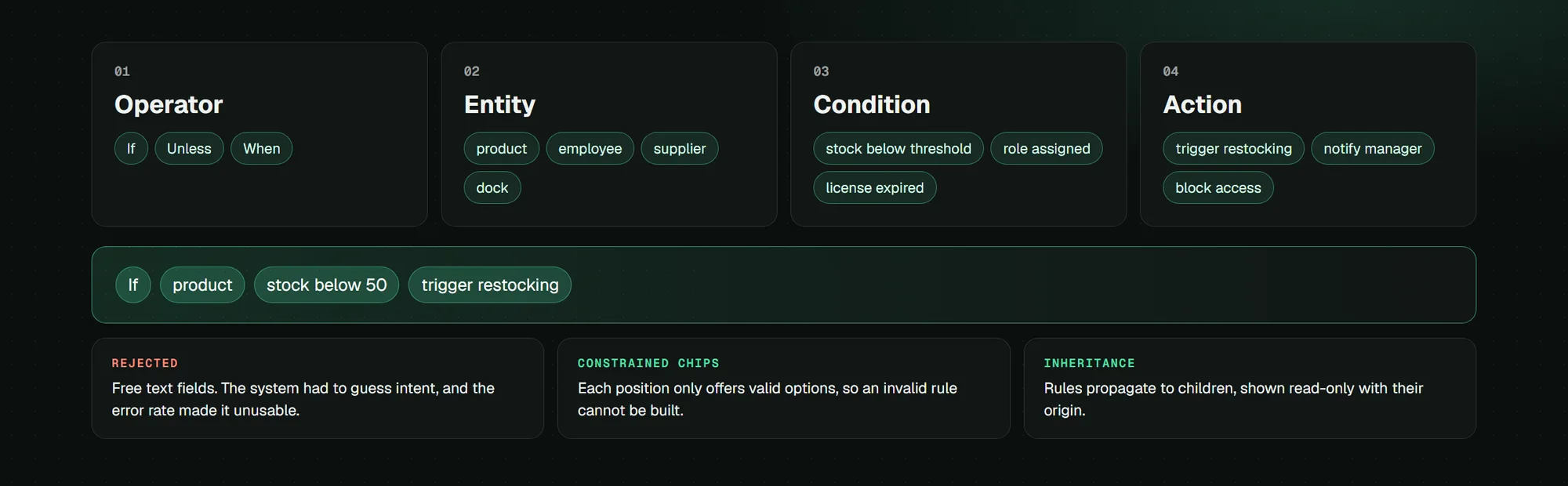
Selecting a card on the canvas surfaces edit, delete, and collapse controls right in its header, with the rule count sitting next to the title as a badge. Clicking edit opens a modal scoped to that single card: name, description, its parent and child connections, and a Rules tab. Inside Rules, the schema is fixed: an operator, an entity, a condition, and an action, each picked from a constrained list and rendered as a chip. A manager builds "If · product · stock below 50 · trigger · restock" without writing a single line of logic.

Product hierarchy canvas, Pharmacy and Cleaning supplies columns: the selected Hygiene card showing edit, delete, and collapse icons in its header next to the 2 rules badge

Selected card · edit, delete, and collapse controls plus the rule-count badge

Rejected approach The first version I tested used free text fields. A manager could type anything, which meant the system had to interpret intent. The error rate made it unusable. Constrained selectors removed the interpretation problem entirely: each chip only offers options valid in that position, so an invalid rule cannot be constructed.
Rule structure · four-part fixed schema
Operator If · Unless · When: sets the conditional frame
Entity product · employee · supplier · dock: scopes the subject
Condition stock below threshold · role assigned · license expired: triggers the action
Action trigger restocking · notify manager · block access: executes automatically

Rules can be scoped to a single card or propagated to all children in the hierarchy. A card that inherits a rule from a parent shows it inside the same modal, flagged with a "Read-only" badge and a note on where it came from. The manager can see what is being enforced and trace it to its source, but cannot edit it on the child: only the card that owns the rule can.

Shampoo card modal with the Rules tab open: an inherited rule from Hygiene flagged read-only, plus two own rules built from if/entity/condition/action chips, each with edit and delete icons

Card modal · Rules tab with an inherited read-only rule and two own rules

The stock view is where that rule actually shows its work. Every product card carries a status (Critical, Low, OK) resolved directly from the threshold rule, not set by hand. A manager scanning this list isn't checking inventory; they're confirming the rule engine is doing its job.

Stock overview: 1,284 products, 23 out of stock, 61 low stock, R$482,000 total value, with per-product status resolved from the threshold rule

Stock overview · status resolved automatically from the threshold rule

06

Governance

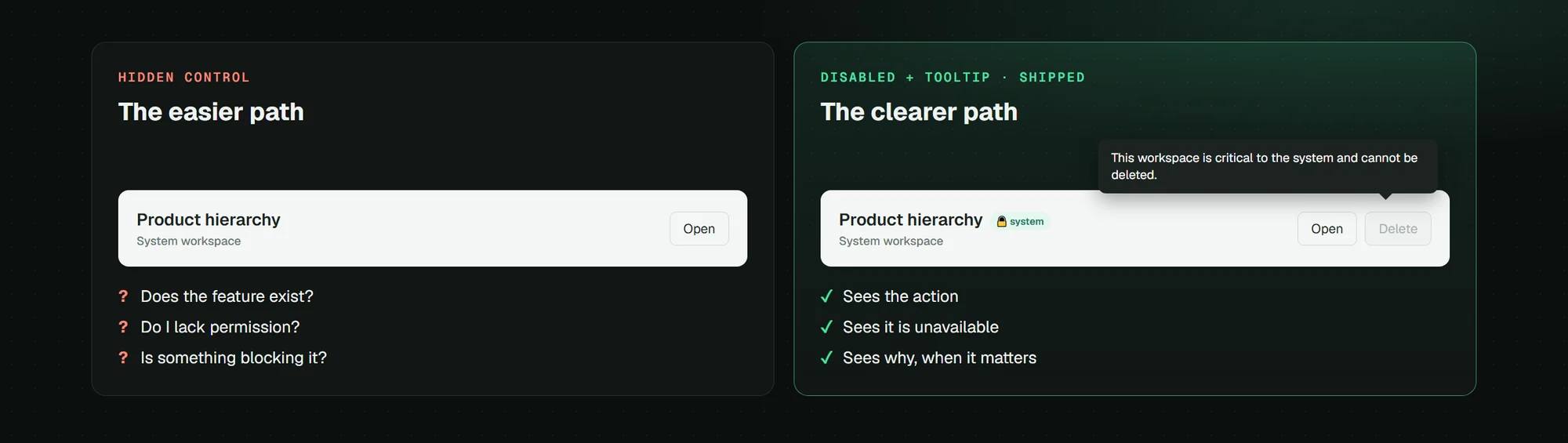
System workspaces show a lock indicator and a "system" badge on the selection screen. The delete control is visible but disabled. Hovering over it surfaces a tooltip: "This workspace is critical to the system and cannot be deleted." The action is not hidden. The reason it is unavailable is stated at the moment the user needs it.

A manager who cannot find the delete option does not know if they lack permission or if deletion is simply not possible in this context. Hiding the control based on permissions was the easier path. It was not the clearer one.

Hidden control

User doesn't see the action. Doesn't try to take it. But also doesn't know if the feature exists, if they lack access, or if something is preventing it. Ambiguity stays open.

Disabled + tooltip

User sees the action. Sees it is unavailable. Sees why. The constraint is communicated at the exact moment the user needs it. No documentation required.

The same logic applied to inherited rules on a card. A rule propagated from a parent is visible to the child's manager but marked as read-only, with a reference to its origin. They can see the constraint and trace it back. They cannot accidentally remove it while editing something else.

Workspace selection screen: System workspaces marked with a critical lock badge

Workspace selection · System workspaces marked critical and locked

07

Design system

The design system I inherited had no tokens. Components that performed the same function existed in multiple versions with no shared source. The Figma file had no structure that would survive a significant change to the visual language. There was no responsive logic because the product was considered desktop-only.

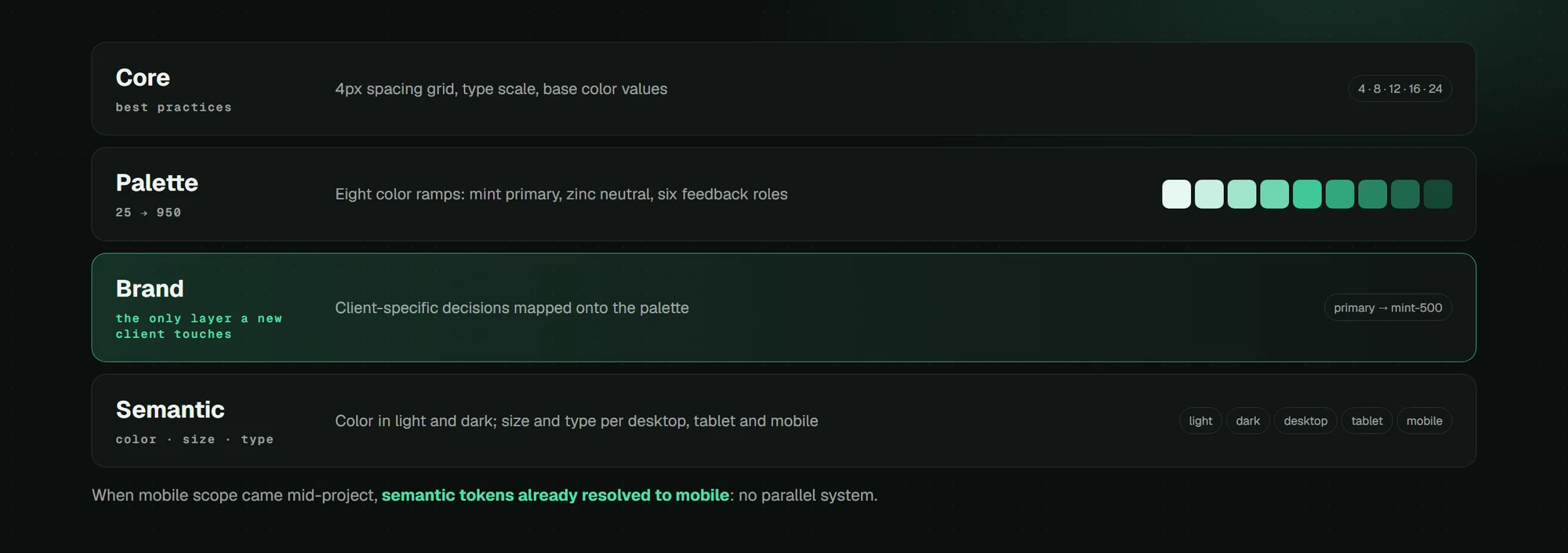
I rebuilt it in four layers. Core holds design best practices: a 4px spacing grid, a defined type scale, base color values. Palette holds color ramps from 25 to 950 across every hue the system might need. Brand is where client-specific decisions live. Semantic splits into three dimensions: color with light and dark modes, size with desktop, tablet, and mobile breakpoints, and type with the same three breakpoints.

Token architecture: Core, Palette, Brand, and Semantic layers, each referencing the one below

Token architecture · Core, Palette, Brand, and Semantic layers

The layering meant that adapting the system to a new client required changes to the Brand layer only. Core and Palette stayed fixed. Semantic recalculated automatically. Eight full palette ramps feed the brand layer: mint for primary, zinc for neutral, plus six more for every feedback role the product needs.

Palette layer: eight color ramps from 25 to 950, covering primary, neutral, accent, and every feedback role

Palette layer · eight color ramps from 25 to 950

Mobile consequence The operations team needed a mobile interface for warehouse staff before launch. Because semantic tokens already resolved to mobile values at narrow breakpoints, the mobile build required no parallel system. The responsive logic had been built before anyone asked for it.
08

Fleet & Dock

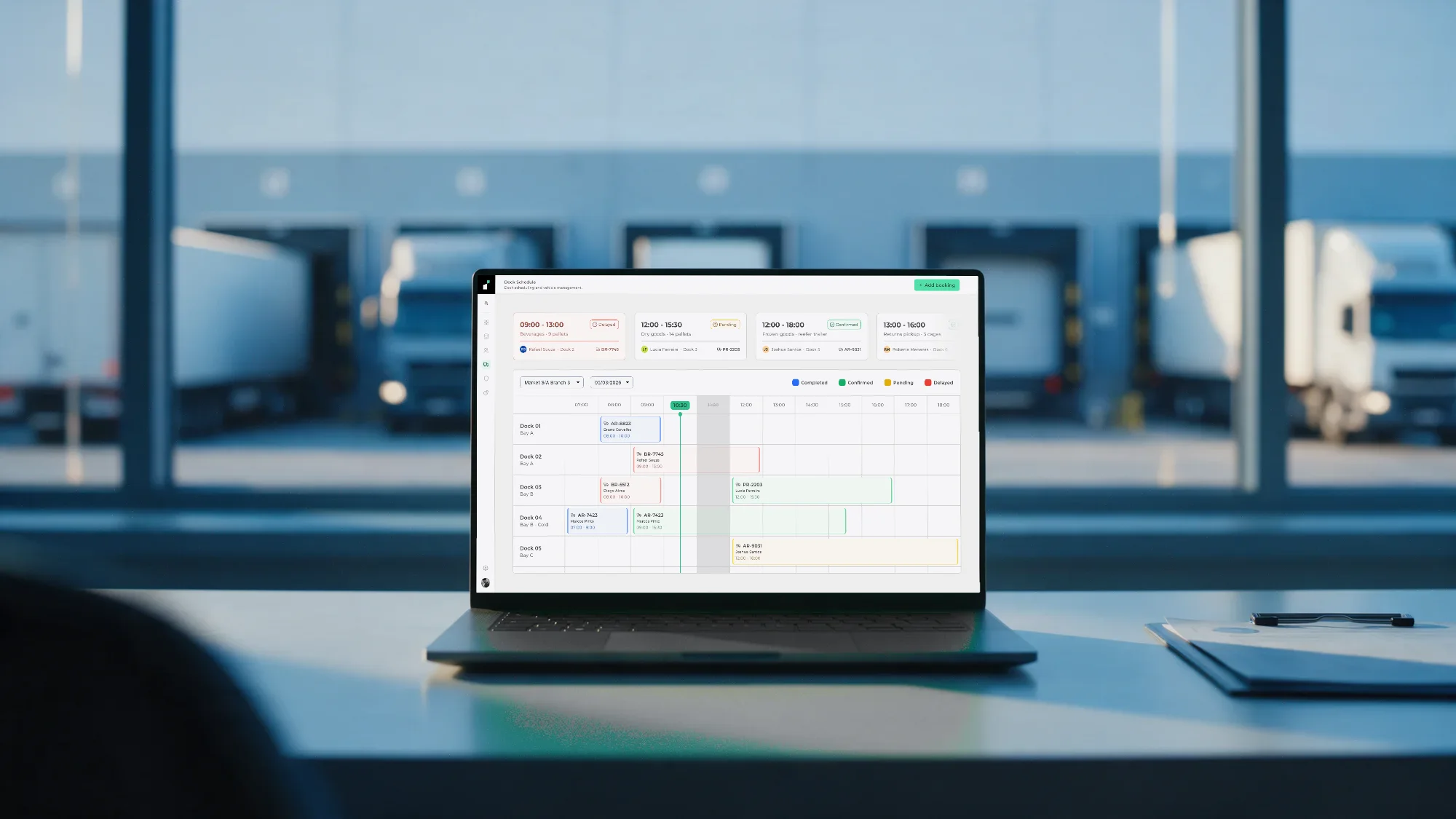
The Data Workspace did not operate in isolation. Instivo included a second module for dock and fleet management: scheduling incoming trucks across numbered docks, tracking drivers and vehicles, logging cargo and destinations.

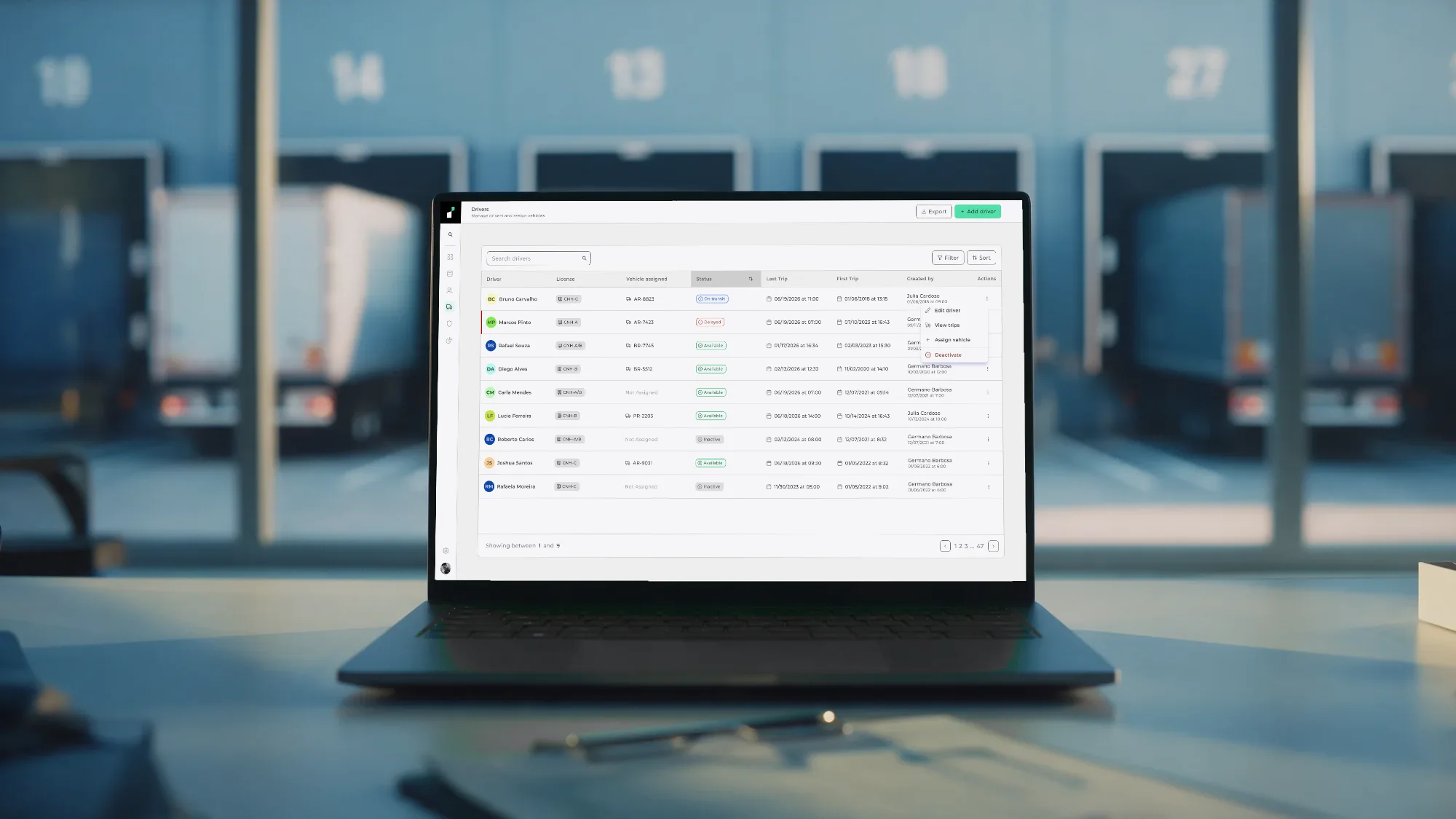
The driver that a manager registered in a hierarchy was the same driver that appeared in a dock booking, pulled automatically from the same record.

Booking a dock slot required a driver record with a valid license category, a vehicle record with a registered plate, a dock record with its assigned bay, and a warehouse record with its management chain. All of those entities were built and maintained in the Data Workspace. The Fleet & Dock module consumed them directly.

No duplication, no manual cross-entry, no integration layer between the two modules. If the driver's license category changed in the Data Workspace, the change was immediately reflected in every dock booking associated with that driver: one record, one source of truth.

Dock Schedule: bays as rows, hours as columns, bookings color-coded by status: completed, confirmed, pending, delayed
Dock schedule · bays by hour, status color-coded
Fleet and Dock module: driver table with license categories and availability
Driver table · license categories linked from Data Workspace
09

Outcome

The product did not reach public launch during my engagement. I left after approximately seven months of design work. What follows is projected based on enterprise SaaS benchmarks for governance platforms of comparable scope.

~70%

Estimated reduction in configuration time when non-technical users act without filing IT requests

Enterprise SaaS governance benchmarks

5×

Faster unit onboarding: new units start from a working structure instead of mapping categories and roles from a blank canvas

Comparable platform deployments

100%

Of manual processes with a defined trigger replaced by rules that enforce the action automatically

System design · rule engine coverage

0

Duplicate entity records across modules: one card, referenced everywhere, updated once

Card-linked architecture

Before Instivo, a configuration change required IT involvement as an intermediary. A manager who needed to modify access permissions, add a product category, or change a restocking threshold could not do it directly. The Data Workspace made all of those actions self-service for the roles that owned them.

This was also the first project where I worked inside a design team bigger than just me, with governance and design-system maintenance as part of the job itself, not something left over after the actual design work. Retail brought its own complexity too: data flows a typical end user never touches directly, hidden entirely behind the interface a manager sees. That combination is why I still check who else depends on a design system before I change anything in it.

Design tokens · entity reference model Figma · constrained dropdown UX Disabled controls · inline explanations

Let's talk

Got a project?
Let's make it work.