This is the original discovery, architecture and research documentation written during the Meaple engagement at Ensight in 2020, translated from Portuguese and lightly reorganized for readability. It's the working document behind the Meaple case study: the raw definition, requirements, personas and interview data the design decisions were built on, not the narrative write-up. Sections the original document left open are marked as such rather than filled in after the fact.
Definition
1.1 Why are we doing this?
Q: What's the reason for this product to exist? What problem does it solve for the client, and for the user?
Solving the lack of a platform that unifies ease of event creation, event tracking, and socialization in a personalized, interactive way.
1.2 Three main questions
1.2.1 What's worth doing?
Everything with high importance and viability should be done.
1.2.2 What are we building?
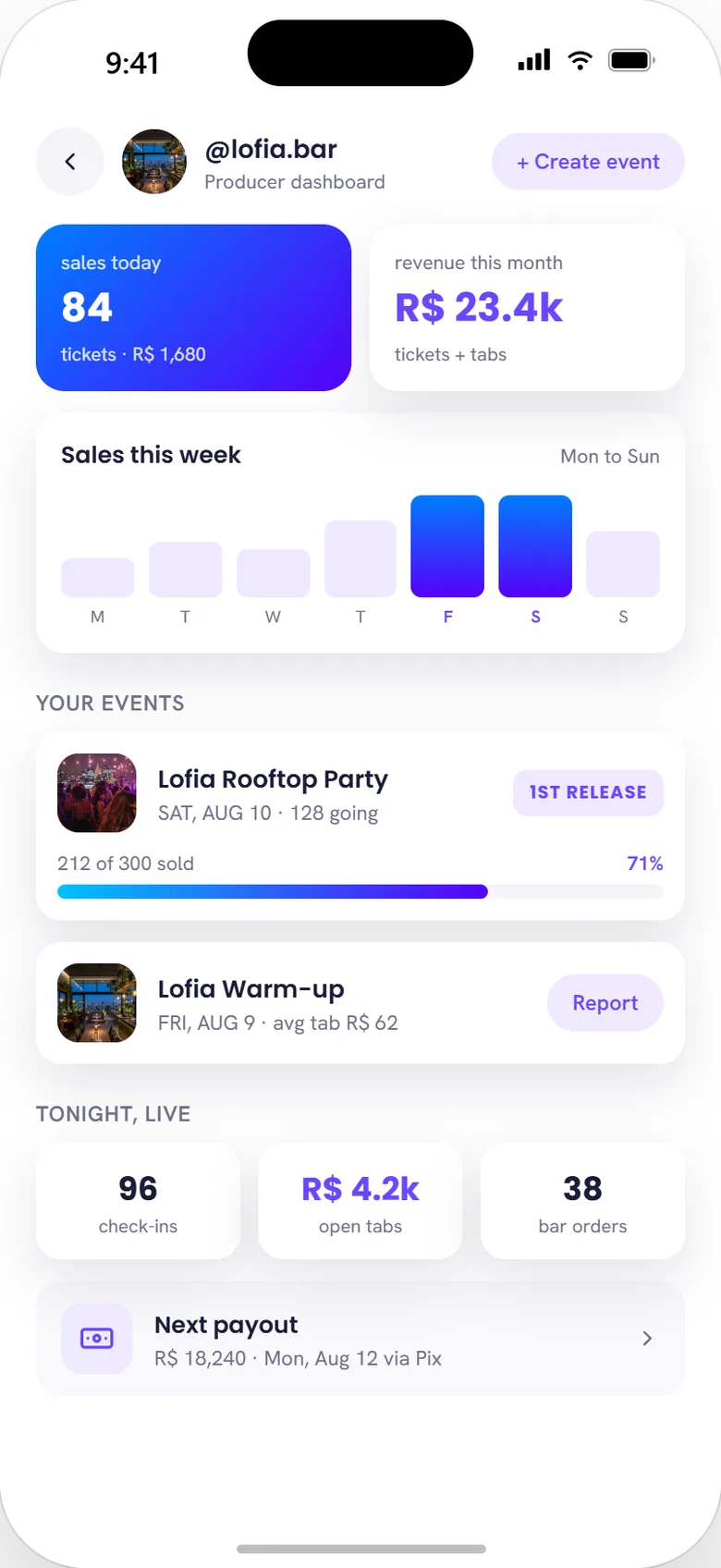
A mobile app spanning five core flows: discovery (an Explore feed ranked by the Momentum algorithm, plus a map view), the social graph (follow-based, with a group chat layer), event creation and ticketing, in-app payment (ticket purchase and in-event consumption via the comanda), and a producer-facing dashboard for sales and event management.
1.2.3 What's the value of the product?
Unifying and simplifying the creation and maintenance of a social network through an interaction model that covers the full lifecycle of an event — from its creation through the experience during and after.
1.2.3.a Who is our target audience?
Three personas came out of primary research, each with a documented day-in-the-life.
Pedro, 21
PUC student
- Extroverted, well known on campus
- Uses Facebook, Tinder, WhatsApp and Instagram
- A bit scattered; loves going out
- Not into new tech, but likes his iPhone 12
- His father pushes him toward a job in his field of study
- Long single, spends heavily going out; his mother can no longer keep covering it
Day-in-the-life
Wakes at 8am, late to class in his father's Audi, no parking near PUC. On his phone through the whole class trying to plan Friday. Can't find anywhere to eat after class (restaurants full, can't move the Audi), grabs whatever's available. Goes to his internship, messes around on WhatsApp and pretends he worked. Heads home trying to set up a hangout. Has dinner, calls two friends trying to find something happening. Ends up home, gaming.
PainAn entire day of coordination, zero results.
Letícia, 26
Civil Engineering, UFPR
- On scholarship, shy, few friends
- Likes small hangouts, dinners, a bar or barbecue
- Uses WhatsApp, Instagram and Twitter
- Studious, engaged with everything at university
- Lives with an aunt she finds difficult
- Travels often to visit family and the beach (favors Guaratuba)
- Dating Fernando, 32, who runs a digital innovation company
Day-in-the-life
Wakes at 6:30, bus to class, arrives on time, studies. A professor mentions a topic she wants to research further. Gets home tired, has dinner, talks to her aunt, watches TV. Her boyfriend calls asking if she's doing anything — she mentions a party but doesn't know where; a friend brought it up the week before and never sent details.
PainThe information exists, it just never reaches her.
Fernanda, 28
Instagram influencer
- Extroverted, enjoys visibility, well known
- Uses Facebook, WhatsApp and Instagram
- Lives on social media, always looking for content
- Into new tech; travels often and posts about it
- Works largely through brand trades and gifted products
- Lives alone with two dogs
- Active in the LGBTQ+ community, unofficially in charge of booking its events
Day-in-the-life
Wakes at 9am, posts a good-morning story. Gym at 11:30, another story. Films a story with her trainer, tags her. Posts lunch. Starts organizing Saturday's event — her own Halloween party, at her house — creating it on Facebook and Sympla, asking guests to pay by transfer or PicPay. Promotes it across Instagram, WhatsApp, Facebook, Snapchat, Twitter and Tumblr, separately announces she'll be at an anime event in Belo Horizonte and tells fans to meet her at the mall at 2pm. Later goes out, calling friends across her 20 WhatsApp and Facebook groups.
PainSix platforms, one party.
1.2.3.b What experiences will be valuable or interesting to them?
- Making plans with friends
- Finding people with similar tastes to go out with
- Meeting new people
- Not waiting in line
- No payment friction
- Professional events
- Creating their own events
- Promoting their own image
- Promoting their event
- Reaching close friends quickly
- Knowing event details
1.2.3.c How will our product differ from competitors and substitutes?
Meaple will provide social tracking and interaction between friends and events end-to-end across event participation, connecting people to moments and moments to easily accessible memories. Meaple offers tools for the full event journey:
- A chat for groups filtered by taste, event, or friendship, making social interaction easier.
- Because it's a follow-based app, users can filter who receives their information — supporting influencer-style visibility while still protecting more private users.
- Payment handled inside the app, easy and efficient.
- Because it covers every layer of events plus geolocation, finding small, nearby, social events is easier.
- More precise information through profile personalization.
- Search based on multiple factors, for a more personalized experience.
- A single interaction layer for event creation and ticket sales, extending reach and efficiency.
- Focus on a genuinely positive experience — not just finding the event, but before, during, and after.
- For business users, the social layer makes information easier to reach.
Its platform covers events of low or high complexity, a social network with followers and data filtering, all backed by an improved, effective messaging system where every experience the user has in the app is continuously shaped for them.
1.3 Competitive analysis
Points to spend = number of problems × average score. Example: 3 × 14 = 42.
| Problem / opportunity | Importance | Viability |
|---|---|---|
| Finding events | 4 | 4 |
| Sharing events | 4 | 4 |
| Ticket purchase | 3 | 3 |
| In-event consumption | 1 | 1 |
| Management and security | 4 | 4 |
| Personal communication method | 4 | 3 |
| Account customization | 3 | 3 |
| Difficulty finding event memories | 1 | 3 |
| Sharing information during events | 2 | 3 |
| Difficulty creating events | 3 | 4 |
| Personal organization issues | 2 | 3 |
| Connecting with events or professionals | 3 | 2 |
| Professional organization issues | 3 | 3 |
| Speed to create small events | 5 | 3 |
1.4 Identifying business objectives
1.4.1 Who are the project's stakeholders?
- Influences the outcomeUsers, Ensight
- Funds the projectEnsight
- Designs the productDhiego Cristofolini (solo)
- Manages the projectFelipe and Bruno Vencato, co-founders
- Engineering2 developers
- Supports the appInfluencers, physical venues, users
- Sells the productEnsight
- Delivers the final productEnsight
- Assists usersEnsight
1.4.2 What are the business objectives and desired outcomes, and how will they be measured?
Targets set for a 17-month horizon:
1.4.4 Who is the user, and why will they use the product?
People with an average level of tech literacy, smartphone users, engaged with (or at least using) social and events apps, aged 19–30, with their own income (classes A and B).
"Gen Z is known for being digitally native, deeply familiar with the internet, file sharing, and mobile phones — not just connecting from home but staying constantly connected through their phones. Their defining traits: technological fluency and social openness to new technology."
Being digitally native makes it easier for this audience to adopt an innovative UI. Their high social/political engagement and need to find a place or "tribe" where they belong tends to involve discovery, nightlife, and lower conformity to social norms. Meaple offers this audience a rich social interaction experience — a social network tied to events, chat, moment-sharing, event discovery matched to personal taste, easier meetups, easier event payment, finding people with shared interests, event promotions, fast small and large event creation, payment security, and — above all — unifying all of it in a single app.
1.4.5 What industry regulations will influence what we build?
Three areas flagged for legal review before launch: LGPD compliance for personal data collected through profiles, location, and payment (Brazil's data protection law took effect in 2020, the same year as this engagement); payment intermediation rules for holding user funds between ticket purchase and event completion; and consumer protection requirements around ticket refunds and event cancellation.
1.4.6 Who will we compete with, directly or indirectly?
Direct competitors span social, events, and chat: Sympla, Eventbrite, Facebook, WhatsApp, Yelp, Snapchat, PicPay, Venmo, Play Party, Hellofriend, Google Maps, Apple Maps, Promoters — mapped across the four functional layers Meaple set out to own at once.
| Product | Event discovery | Social coordination | Payment | Location |
|---|
1.5 Identifying user needs
1.5.1 Is the product B2B or B2C?
B2B2C.
1.5.2 What do users expect to be able to do with the product?
- Find interesting events
- Create events quickly and intuitively
- Build and manage groups or events in a single app
- Keep up with friends' activity
- Discover new experiences they'd never have found otherwise
1.5.3 Why do these things matter to them?
They save time and money, reduce frustration, and make transactions and event logistics safer.
1.5.4 What are users doing right now to solve these problems?
Sympla, Eventbrite, Google Maps, Apple Maps, Facebook, WhatsApp, Yelp, Snapchat, PicPay, Venmo, Play Party, Hellofriend.
1.5.5 What solutions deliver value to them?
Information and communication that's easy to access and generated from the user's own in-app activity — avoiding red tape and creating a dynamic, fluid interaction that reduces frustration and organizational friction.
1.6 Creating a decision path
Mapped separately for each side of the marketplace:
| Proposal | Context | Convince | Convert |
|---|---|---|---|
| Consumer: find and join events with friends, without juggling five apps | Explore feed ranked by relevance and proximity; friends' activity visible | Producer verification badge, going/interested counts, social proof in comments | Buy ticket in-app |
| Producer: sell tickets and grow an audience without giving up control | Event history, ratings, and analytics visible on their own dashboard | Revenue from ticket fees and in-event consumption, page infrastructure at no upfront cost | Create first event, verify account |
1.7 Generating requirements
1.7.1 What do users or the client say they need?
- Easier event search
- Stronger privacy filters
1.7.2 What do we believe they actually need, based on research and interviews?
- More precise interactions
- Easier, better categorization
- Less friction across events, meetups, and groups
1.7.3 What do we believe our audience and stakeholders don't know they need?
- A platform with more precise event updates
- Unification of events, social network, and chat
- Easier payment
- Faster creation of small events
1.8 User testing plan
1.8.1 Who are we testing with?
19–30 years old, students or working in the field.
1.8.2 What are the most popular devices among our users?
Android 4.4+, Apple iOS 10.0+.
1.8.3 Which OS / browser combination is most common?
Android, Apple iOS and Windows: Safari, Chrome, Firefox, Opera, Edge.
1.8.4 What connection speed or type do they use?
3G, 4G, Wi-Fi.
1.8.5 How tech-familiar are our users?
Most use a smartphone and social apps.
Browser and device support was prioritized into three tiers:
| Full support | Partial support | No support |
|---|---|---|
| Readable content · all functions work · layout matches the approved UI as closely as possible · navigation fully functional | Readable content · navigation fully functional · login flows stay smooth · UI degradation must never obscure content | No support or testing |
Every feature planned for Meaple: splash screen, account creation, login, password recovery, data confirmation, signup helper, terms of use, profile configuration, feed, categories, tags, business account activation, page system, event system, event feed, social feed, chat, geolocation, map, invite system, fintech, browser, notifications, profile page, preferences system, Momentum, event page, business page, calendar, gamification, streaming, web events.
- Splash screen
- Login
- Account creation
- Data confirmation
- Password recovery
- Profile config
- Categories
- Tags
- Signup helper
- Profile page
- Business activation
- Business page
- Social
- Profile config iteration
- Business page iteration
- Event history
- Notifications
- Vaquinha (group pool)
- Payment (definition)
- Chega aí
- Rolê
- Branding layout
- Auto events (definition)
- Interaction methods
Architecture
2.1 Identifying the content workflow
Roles and responsibilities across the content pipeline:
- Add text, photo, video, feed, forms, etc.Designer, User
- Create new pagesDesigner, User
- Delete pages and functionsDeveloper
- Add or update the databaseDeveloper
- Publish content to the test serverDesigner
- Return new/edited content with commentsDesigner
- Schedule content for publicationDesigner
- Format headers, tables, captions, links, etc.Designer
Q: Can authors create new pages, or only edit existing ones?
All authors can create and edit their own page, post, and content.
Q: Who's authorized to create subcategories and subfolders?
All authors can create and edit tags, personal pages, IDs, and feed.
Q: Can authors delete pages and digital content (photos, videos, etc.)?
Only the content's owner. Exceptions are kept for reports of inappropriate pages, events, accounts, or tags.
Q: Can editors approve content site-wide, or only in sections they're responsible for?
The design editor can approve all content across the app.
Q: Is multi-step approval needed? Are approval requests delegated to another editor when the responsible person is unavailable?
No — with a single design editor, approval is a single step. If unavailable, publication waits rather than routing to a second approver, given the team's size.
Q: How is the workflow handled when multiple authors work on the same page?
Direct coordination rather than a formal locking system — the team was small enough that conflicts were resolved by talking before either side started work.
Q: Are content managers informed of publish updates, and are changes documented?
Yes — the co-founders were kept current through the roadmap in §1.8, updated as each milestone shipped rather than through a separate change log.
2.2 The five states that affect context
2.2.1 Physical
- Using a phone; possibly holding it in the left hand
- Probably navigating with one hand only
- Low chance of consuming content in a fixed location
- Likely doing something else at the same time
2.2.2 Environmental
- Could be in a silent room or an extremely loud one, like a club
- Frequently interrupted while using the app
- Probably using the app while walking down the street
2.2.3 Preferential
- Prefers fast, intuitive access with few steps
- Will be consumed on phones and possibly tablets
- Young audience: content must be far more visual than textual
- Can't depend on audio — the app will often be used in loud places
- Audience skews mid-to-high education, but includes users with little or no formal schooling — language must stay approachable
- Some users may have physical impairments
2.2.4 Emotional
- May be under high stress — the app needs to stay as intuitive as possible
- Motivated by paying quickly at an event or finding a friend fast; also used to plan events with friends or family
- Wants speed and ease, both for arranging plans and for reaching out to people
- This generation rarely goes without a phone, which helps distribution
- If the app doesn't deliver on why they downloaded it, adoption drops sharply — losing potential users for both data collection and monetization
2.2.5 Cognitive
- A digitally engaged audience means real competition — the app must feel innovative without straying too far from current usability norms
- Visual-first consumption means the layout has to be genuinely attractive
- This age group is also the most receptive to learning, which allows room for one or two genuinely novel UI patterns
- Because the app spans events and socializing broadly, it reaches nearly every age group — content must stay clear enough for users with little schooling or limited digital fluency
2.3 Determining information priority
2.4 Information architecture
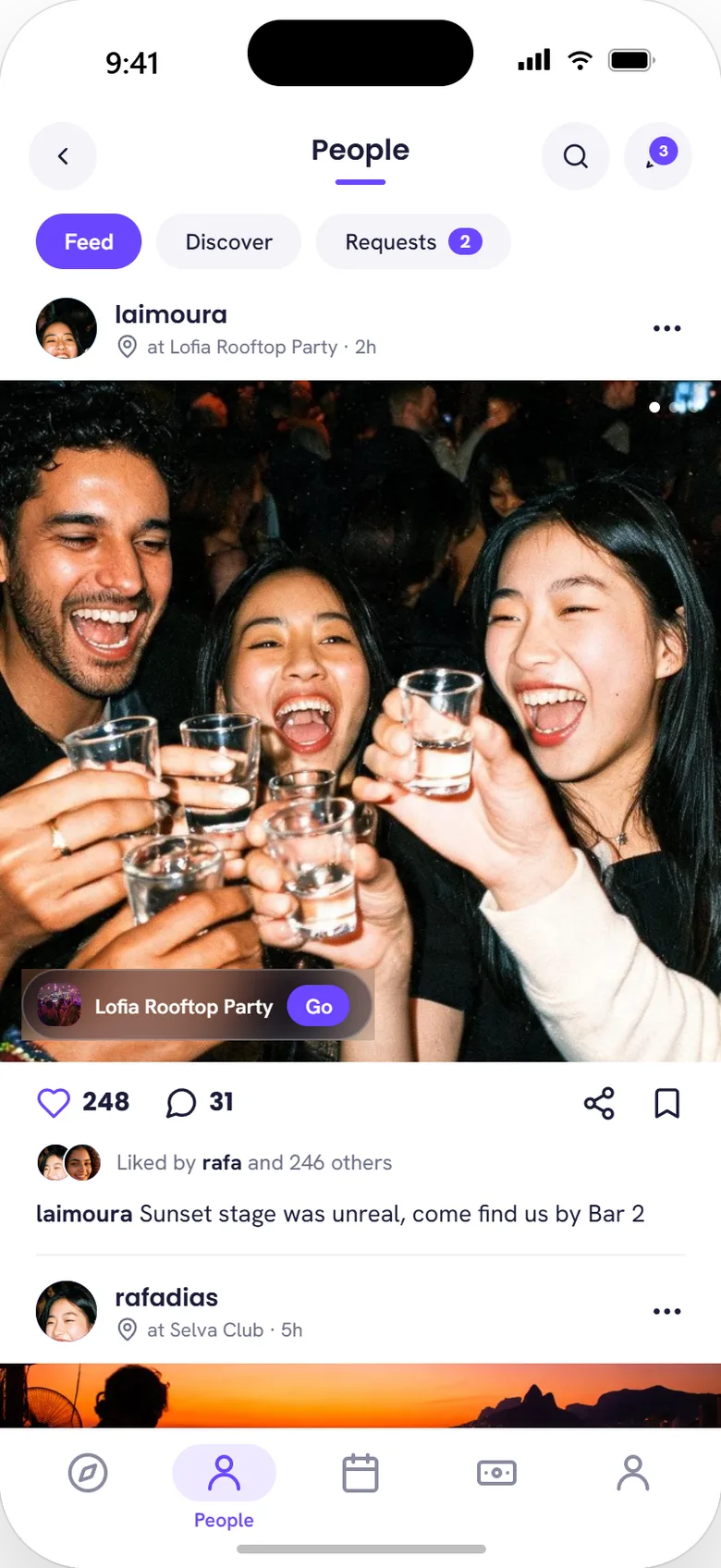
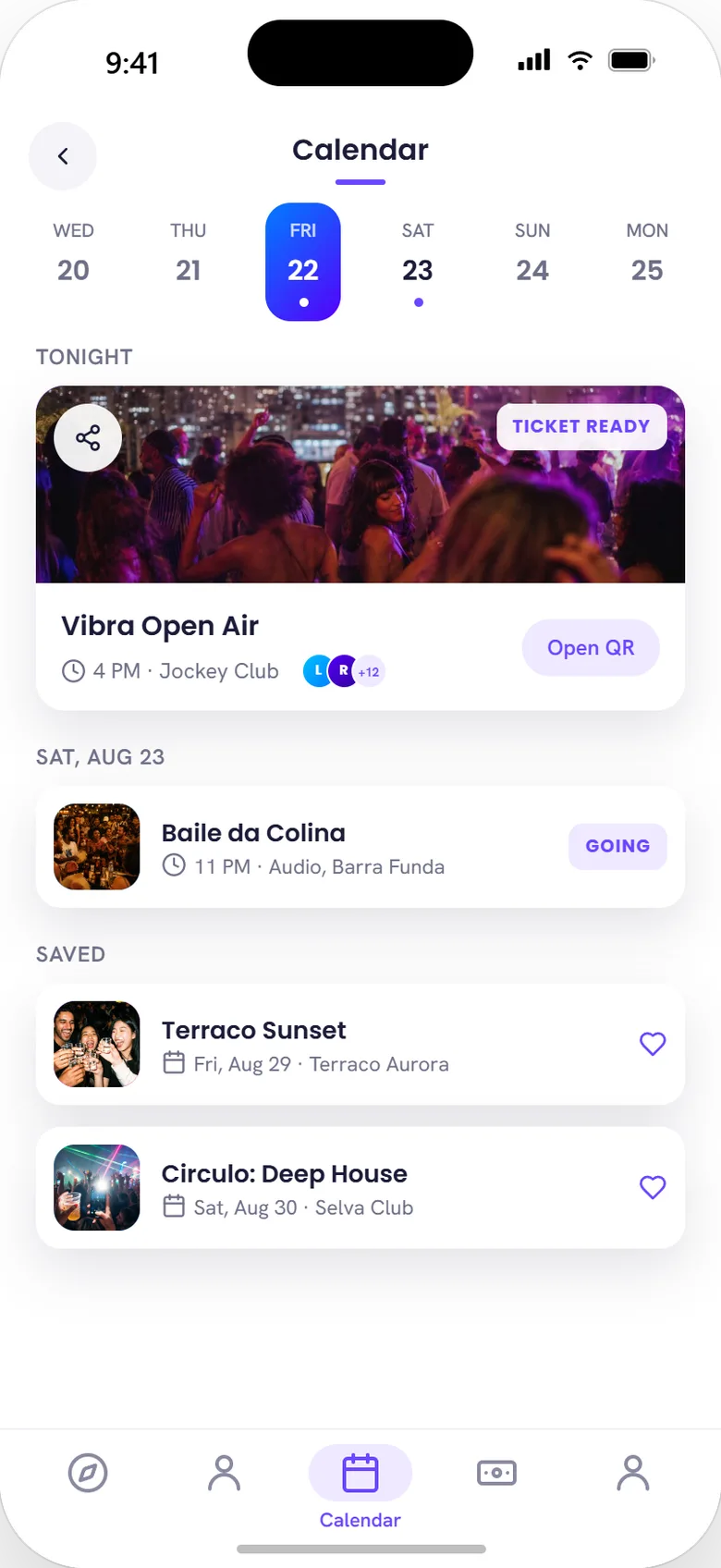
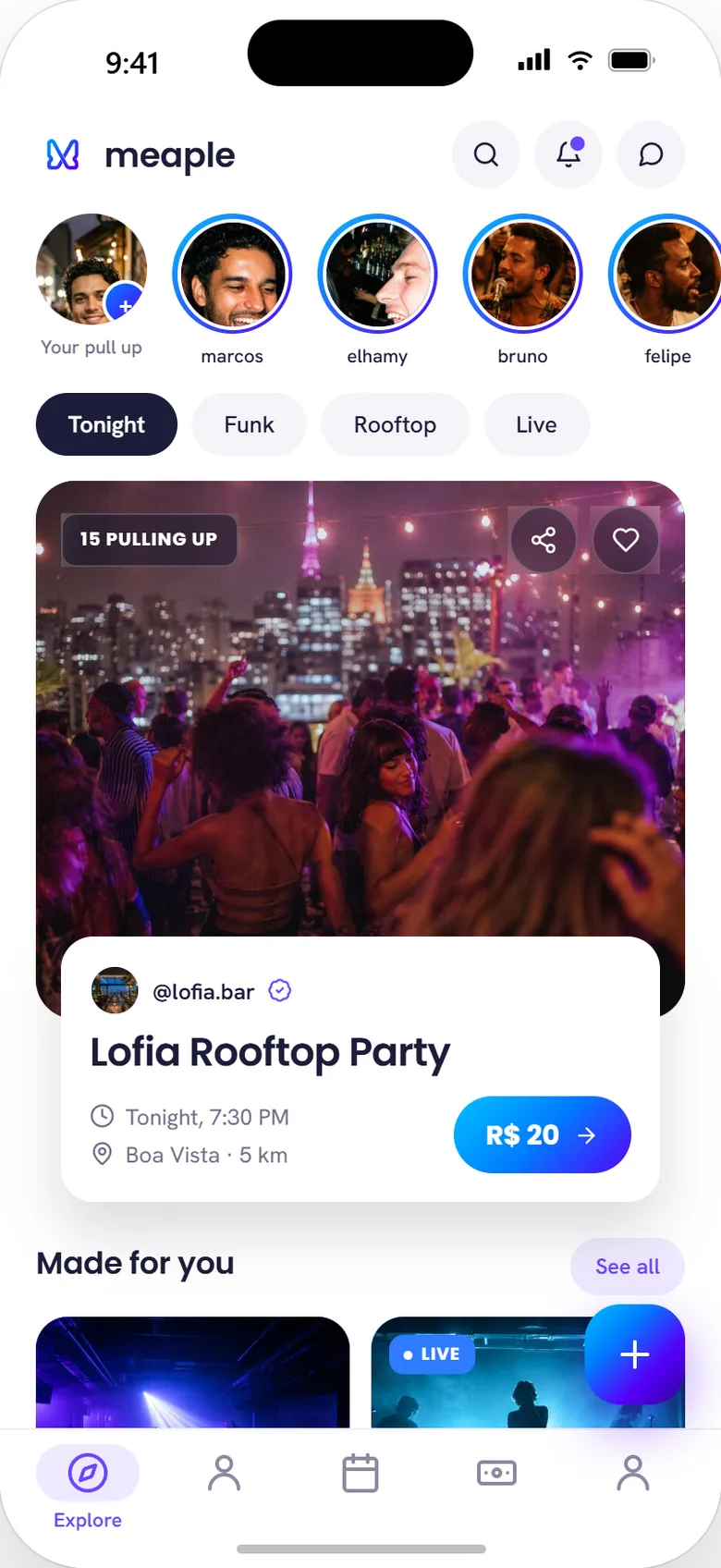
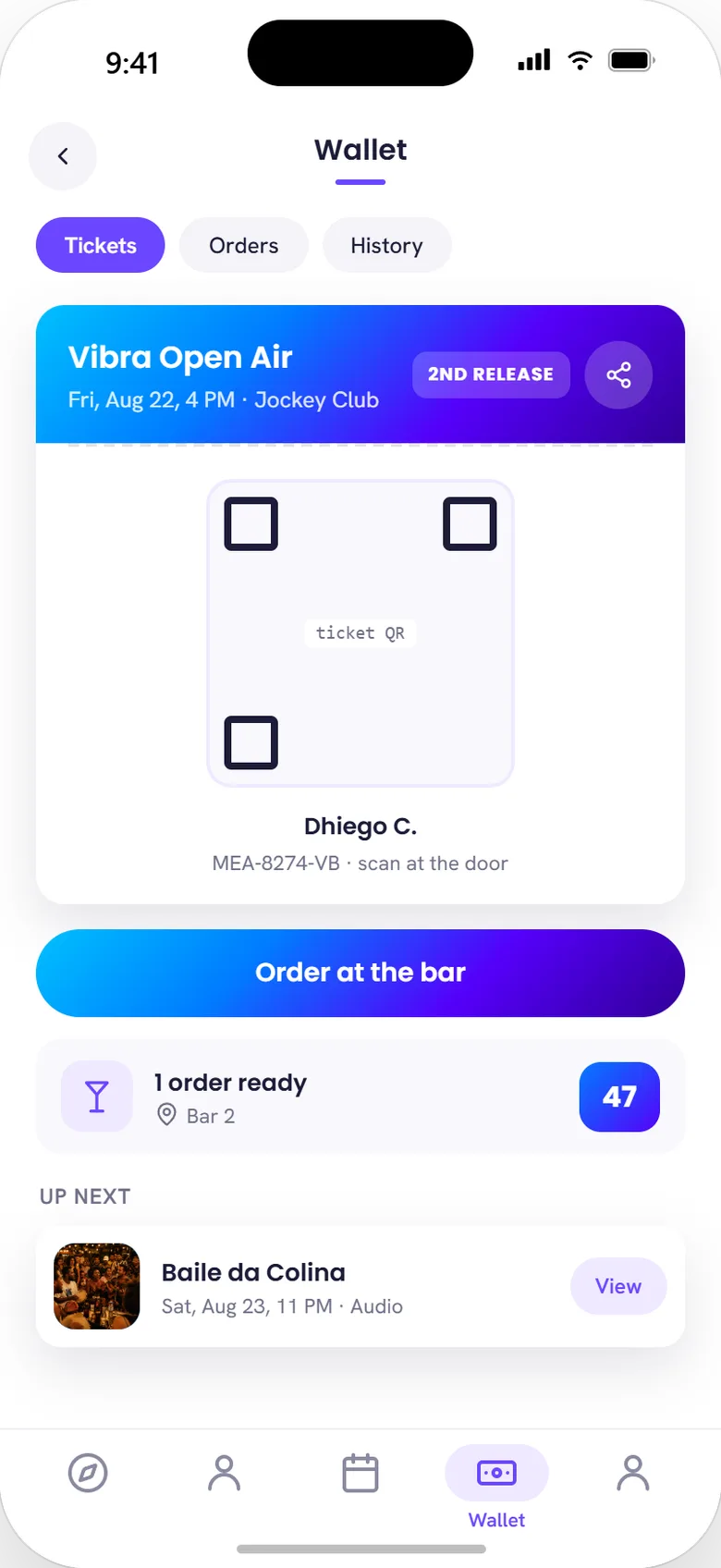
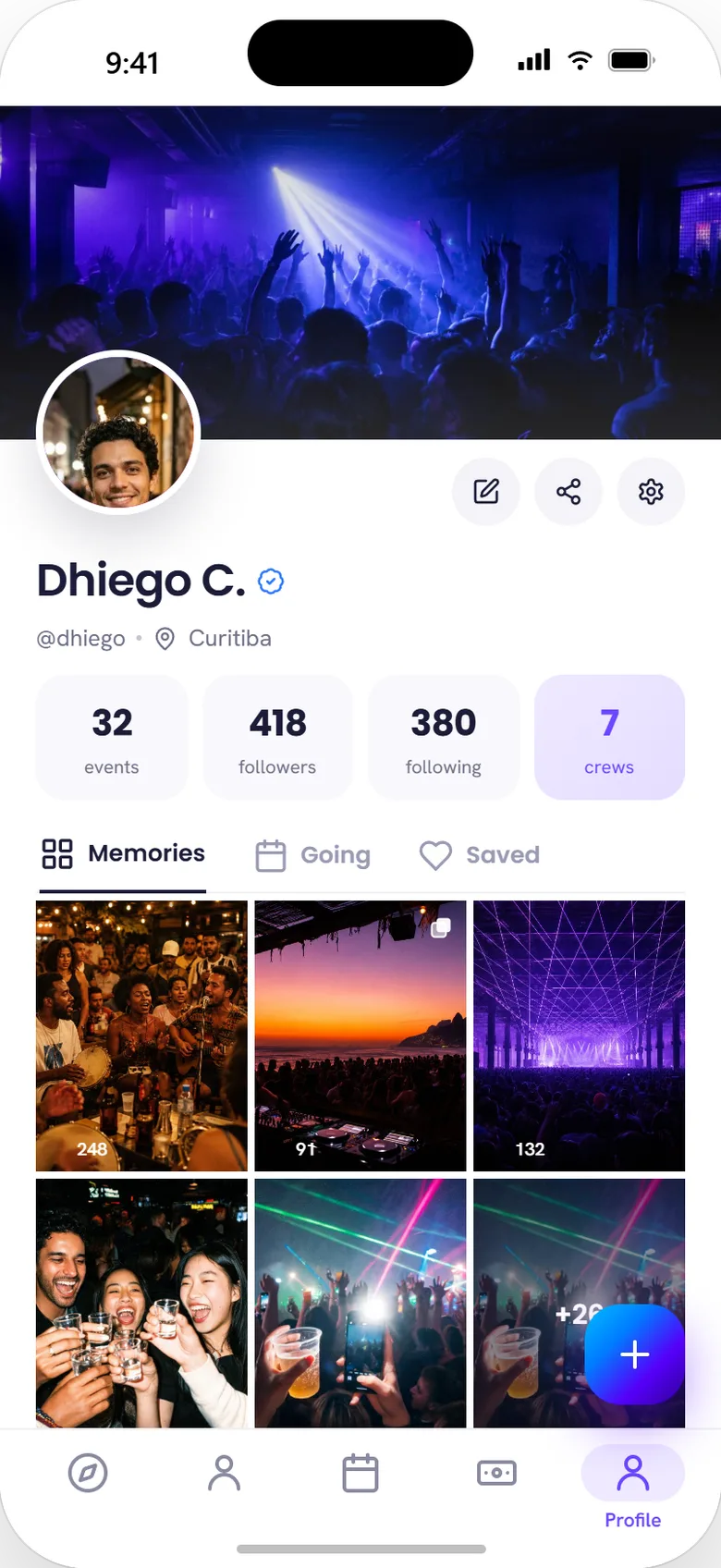
A five-tab bottom navigation carries the whole app: Social (feed, discover, requests), Calendar (upcoming and saved events), Explore (feed + map, the default landing tab), Events (renamed from an earlier Wallet label — a ticket now opens into its own Ticket / Orders / Tab / Feed sub-navigation instead of a flat list), and Profile. Event and business pages, chat, and checkout are reached from within those tabs rather than surfaced as their own top-level destinations — matching the priority order set above.
 Social
 Calendar
 Explore
 Events
 Profile
2.5 Determining key navigation paths
2.5.1 What's the value proposition?
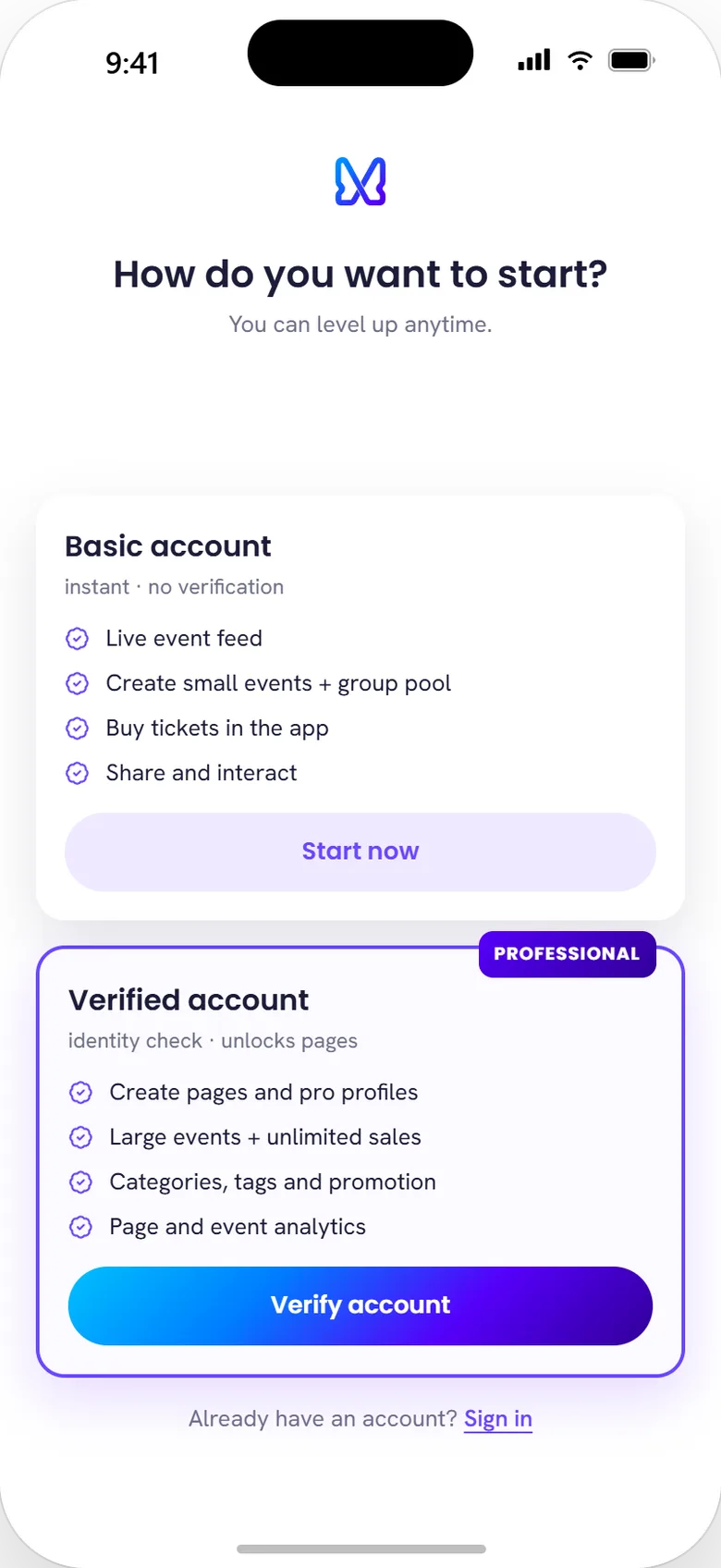
Signing up with basic information gives the user a live feed of updated events, the ability to create small events and group pools (vaquinhas), in-app ticket purchase, and sharing/interaction with events and profiles. Completing advanced signup and confirming their data unlocks page creation — professional profiles, larger events, and more tag and promotion options.
 Onboarding fork
 Event page
 Producer dashboard
2.5.2 What does the user want to happen, and what do we want to happen?
The user wants speed and efficiency finding and creating events, wants to know what their friends are doing, and wants easier interaction with the event itself (delivered through chat and feed). Our objective is verified users with monetizable app usage — in exchange for the value we deliver by signing up and staying active, we receive information and, potentially, monetization.
2.5.3 What other events are valuable to our product, in hierarchical order?
- Content creation (events)
- Content sharing
- In-app monetary transactions
- Engagement
- Basic signup
Q: Is the path to these outcomes obvious?
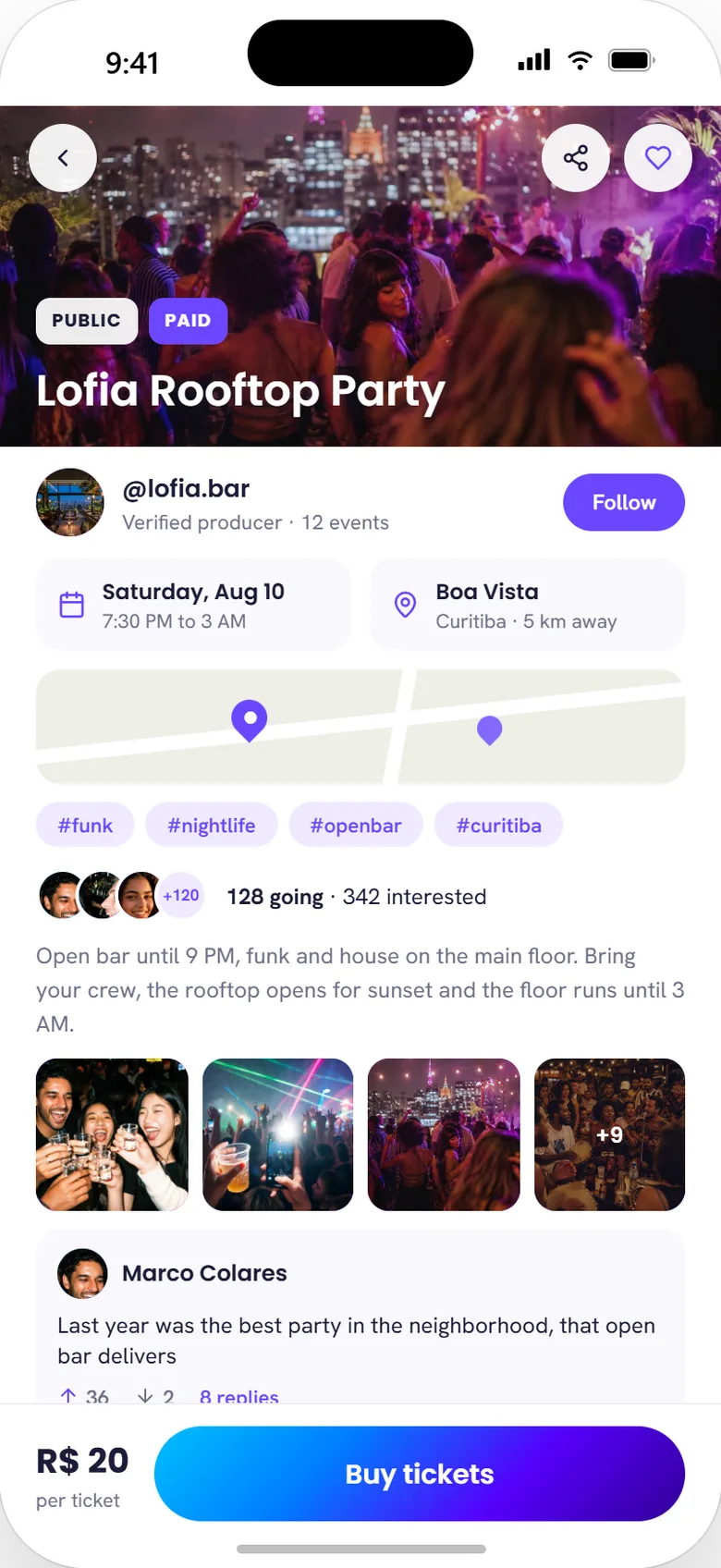
Yes for the consumer side — browse the feed, tap an event, buy a ticket is two taps deep from the app's default screen. Less so for producers, whose path runs through account verification first; that trade-off is the subject of §04 in the case study.
Q: Does this path also answer other open questions?
Yes — it's the same two-tier structure documented as the answer to §2.5.1, applied here to the value hierarchy instead of the account model.
Interactions
The interaction model will keep adapting and being built over time. Planned interaction types: quizzes, votes, choices, preference-matching, and filters (Snapchat-style).
Primary user research
One-on-one B2C interview, conducted under a fixed methodology: no specific product questions, no problem-solving on the interviewer's part, no suggested solutions or directions, and enough patience for a slow, sometimes hesitant answer to fully form. Every session opened with a fixed context statement:
"We're building an app focused on events and social networking, where you can make payments, create events, and socialize."
Respondent profile
- Age / gender / occupation23, female, bartender
- DevicesiPhone 8 Plus, Windows desktop, Windows notebook
- OS / browserWindows 10 / Google Chrome
- Connection4G / Ethernet
- Tech familiarityOwns a smartphone; uses Twitter, Instagram, Facebook, WhatsApp, Telegram
Interview transcript
Q: What task would you most like to postpone or avoid in an app like this?
Facebook — reduce the time it takes to find an event, it's very hit-or-miss. Instagram — depends on other people's posts and reactions.
Q: What frustrates you most in an app?
Facebook — wrong categorization; the app doesn't respect the search filters you select. WhatsApp — group issues, doesn't notify her when she's added to a group, and she hates having to constantly reply to people.
Q: How often do you use apps like this?
Every day, every hour — mostly Twitter.
Q: What do you use them for most often?
Facebook: rarely, to check events and pages. WhatsApp: quick conversations, planning more intimate things — friends, family, small get-togethers. Instagram: the social network with the most friends right now; loves seeing photos. Twitter: staying in touch with friends.
Q: Can you walk me through your process inside the app? What else do you do before, during, and after using it?
It's a leisure-time thing. Rarely used for anything urgent.
Q: What do you like about these apps, and what would you want improved?
Facebook: ease of finding what you're looking for. Instagram: promotions and announcements.
Branding process
First meeting
- Define the working group and who owns it
- Initial discussion of the brief: project goals, why it became necessary, why now, expected results, available timeline and budget, evaluation criteria, milestone breakdown
Second meeting
- Resolve open questions left over from the first briefing meeting
- Share document copies with everyone responsible for review
- Most important: check whether competitors are using design as a competitive advantage — which design elements are working well for them, how they're pulling it off, and where the weaknesses are
- Identify what can differentiate the proposed product from the competition